Campus Events Calendar Guidelines
Requesting a Group Calendar
The Mizzou calendar is available to all university units as the official calendar platform for university-led or -sponsored events/activities. It is managed by Mizzou Marketing and Communications Digital Service team. To request a group calendar, complete the Digital Service Request Form.
User Management Access
Digital Service manages the platform and adds or removes all users. Listed below are the criteria addressing user access.
- Training is a requirement for new user access and can be requested from Digital Service.
- Editor access is granted to those who have yet to receive training or need to follow an internal approval workflow within their respective unit.
- Publisher access is granted to those who have received training, except for student workers who will have editor access only.
- Curator/Administrator access are reserved for Digital Service.
- Calendar groups are limited to 2 users to maintain consistency in the group’s management.
- Access will be removed if users become inactive, leave their role within a group or leave the university.
- Changes in user access needs for each calendar group must be communicated requested from Digital Service to maintain secure calendar groups.
Event Publicity
University-led or -sponsored events are publicized through the Mizzou Campus Events Calendar, department and unit webpages or newsletters, LED screens and Mizzou Info.
Administering Your Group Calendar
For general instructions on adding and managing your events, see the LiveWhale calendar documentation provided by the vendor.
Types of Events
The Mizzou Events Calendar is intended for university-led or -sponsored events that are:
- Open to the public or to interested members of the university community such as faculty, staff or students.
- Led or sponsored by an officially recognized Mizzou academic unit, department or administrative unit.
The following events are not approved for posting to the calendar:
- Events that lack appropriate sponsorship by a Mizzou entity or lack a clear connection to the university.
- Student organization events are synced to the campus events calendar after being submitted to MU Engage. These types of events are not permitted to be entered directly into the campus events calendar.
- Internal events, such as classes, department meetings or an invite-only audience, should not be displayed on the university calendar.
- Fundraising efforts not tied to an event are not permitted on the university calendar.
Mizzou reserves the right to edit or delete event listings if they do not meet appropriate criteria, including language that does not meet the university’s editorial style requirements, university policies and procedures, or violates local, state or federal law.
Submitting Events to the Main University or Departmental Calendars
Requesting your event to be posted on the main university or departmental calendars do not automatically guarantee that it will be approved. Staff from Mizzou Marketing and Communications review and approve the list of submitted events daily. These events must meet the criteria outlined below:
- Events must be of general interest to a broad audience.
- Events must be located within the Mizzou campus or surrounding area to be a part of the Campus Events Calendar.
Suggesting Events for the Mizzou Campus Events Calendar
Events you add to your group calendar will be posted there by default once published. To have your events added to the Main University Calendar, you must use the “Suggest event to main university calendar” checkbox in the Sharing and Privacy section at the bottom left of the add/edit event page. Checking this box does not immediately add the event to the university calendar; it instead puts the event into a moderation queue.
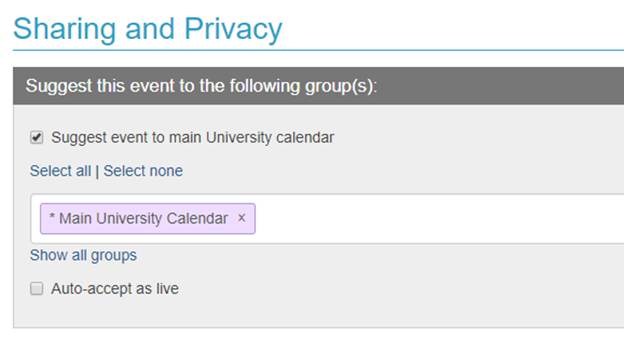
The “Suggest event to main university calendar” checkbox in the Sharing and Privacy section does not immediately add the event to the university calendar; it instead puts the event into a moderation queue.
Adding Calendar Events to your Webpage
The calendar platform offers several ways to post events on your webpage. Contact Digital Service to request this option on your website.